
Lists

Lists make content easier to read by breaking up large blocks of text and highlighting important information. They are effective for presenting key concepts, sequences, or similar items.

Impact


Proper list structures are essential to ensure meaning within lists is not lost. When lists are explicitly created as lists, screen readers can inform users that they have landed on a list and can provide users with context.

Formatting Lists


Numbering Built-in List Tool in Microsoft Word

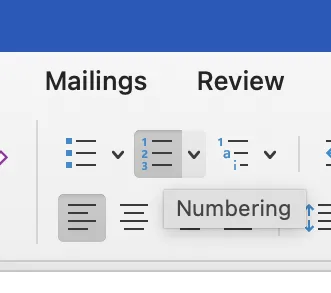
To create properly formatted lists, always use the built-in list feature in the authoring tool you are working in. An example of a built-in list tool are the Bullets, Numbering, or Multilevel List icons in the Microsoft Word ribbon.

Best Practices

  • Avoid manually creating lists using indentations or punctuation alone. 
  • Avoid creating your own bullets using characters, asterisks, dashes, or emojis. 
  • Avoid manually typing numbers to indicate a numerical list.

Bulleted Lists


Bulleted (unordered) lists should be used for items that are related but have no particular order to them.

Do this
  • List item 1
  • List item 2
  • List item 3
Don't do this

- List item

- List item

- List item

Numbered Lists


Numbered (ordered) lists should be used for items that are related and have a specific order to them, such as a sequence or process.

Do this
  1. Cook beans for 45 minutes.
  2. Cut vegetables in small cubes.
  3. Sauté onions and garlic.
  4. Deglaze using the tomatoes.
  5. Add corn and beans.
Don't do this

⭐ First item
❤️ Second item
👍 Third item

Nested Lists


Nested lists are lists that are structured within lists and can be ordered or unordered.

Do this
  • Fruit
    • Apple
    • Pear
  • Vegetables
  • Dairy
Don't do this

> Fruit
     >> Apple
     >> Pear
> Vegetables
> Dairy